Friday, April 26, 2019

RCSD Podcasting

It's been a while since my last post, but this one is worthy of the wait;)
IM&T Interns were asked to assist Steve LaMorte, Director of the Social Studies Department with creating the Reframing Rochester Podcast Series.  Our first podcast focused on the life of Ana Murray-Douglass, Abolitionist, Underground Railroad Conductor and wife of Frederick Douglass.  Our hope is that more High School students will take part in podcasting about Rochester's rich history. 
Click here to learn more about Ana Murray-Douglass

Wednesday, January 24, 2018

A Morning with a Strong Teaching Team and Wonderful Students


I spent a morning with Christina Galambos and Leanne Fuller and their students, to learn the logic behind their classroom space organization, successful team teaching approach and use of technology.  The teachers have twenty two students in their 3rd grade ICT classroom; Sheila Eagan provides pull out ELL services to small groups of students at various times during the day.  The ladies use technology throughout the day in their center rotation schedule.  They rarely teach with whole class instruction.     
Student Teacher Conference

Their day started at 7am with a meeting between Christina, her student teacher and coordinating College Professor discussing next steps for the student teacher in her placement.  Leanne was busily setting up her teaching space and prepping the breakfast area for students.  The sun had yet to show itself.  

Students began arriving at 7:30am, greeted by Christina at the door with Leanne in the room to ensure students were getting ready for their day; starting with breakfast.  Steps for morning routines were clearly posted (words and pictures) on the SMARTboard:

  1. Unpack backpacks
  2. Eat breakfast
  3. Sharpen pencils 
  4. Use the bathroom
  5. Visit with neighbor or read your book quietly

The first thing you notice upon entering the room is the lighting. Each of the fluorescent lights have been fitted with covers that not only dim the lighting, but illuminate scenes of the sky and clouds, flowers, and insects busily pollinating.  The blinds are drawn to minimize the glare on  SMARTboards, chromebooks, computers and laptop screens.
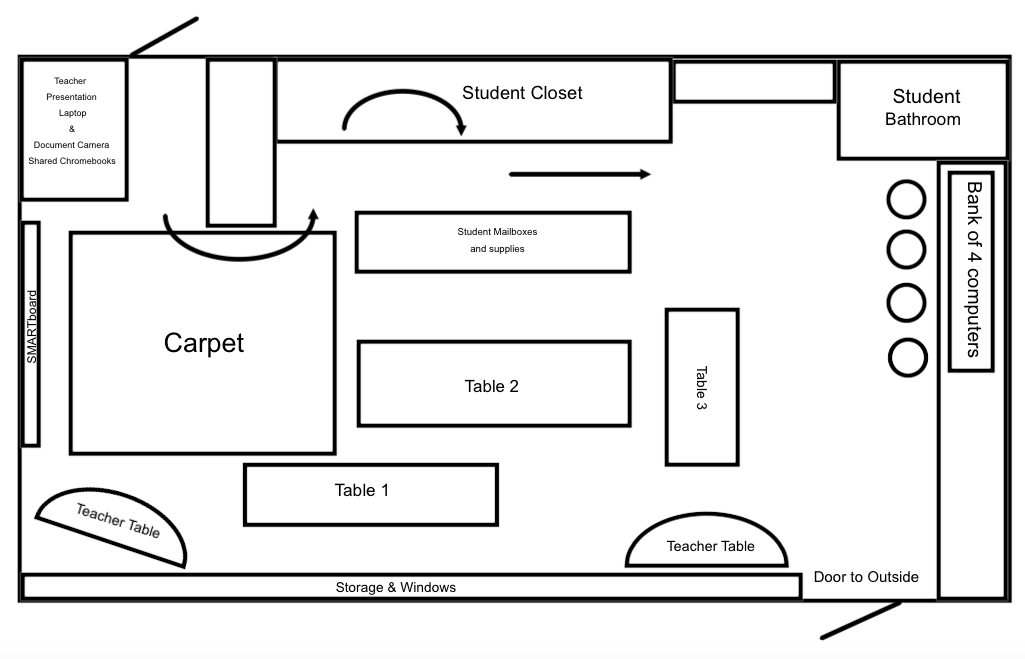
Entrance to the long closet.  Exit on the other side.

Classroom Management is seamless due to clear, simple rules posted and a teaching team that consistently communicates/references the expectations. The behaviour expectations are quickly established in the first two weeks of the school year and only need quick reminders at this point in the year.    

The closet has been organized with an entrance and exit to promote a safe and efficient flow of student movement from arrival to departure.  Students only return to the closet for lunches or backpack items if they ask their teacher. Furniture, including student and teachers tables/desk, cabinets, tables and banners are organized for efficient flow of students and teachers throughout the day. Teachers have opted for kidney shaped tables for desks/center work locations and have removed teacher desks to make room for a learning space that meets their needs, and most importantly the needs of their students.  When students are not in a center rotation with other students and a teacher, they are at their designated desk/table or carpet, working independently on computers/chromebooks.         
Layout of Classroom

Student and teacher voice volume in the room is a hum of student and teacher academic discussion.  Teachers ever so slightly raise their voices to move students between centers every 15-20 minutes.  The classroom does have an audio system with teacher microphone that is used sporadically to communicate whole class instructions.  The school uses a ticket reward system (Eagle Bucks) and each teacher occasionally rewards for on task, focused work or responsible interactions.  The teachers have opted not to use Class Dojo or other reward/ding systems. Eagle Buck tickets can be used for the upcoming Valentine Dance or other store purchases.   

The room is very organized with features that promote calm and easy access to teaching and learning tools. Technology is accessed independently by students when they need to use it for their learning.
Special seat cushion
Classroom Management is seamless due to clear, simple rules posted and a teaching team that consistently communicates/references the expectations.  The routine is quickly established in the first two weeks of the school year.  “Antonio I need to set up a meeting with you to review reading your book.”  Christina calmly communicates to Antonio, sitting at his table a different center from where Christina is working with a small group of students.  Antonio quickly redirects to reading instead of tapping his book as if it were a drum.
Technology use by students was mapped out before the year began.  Tech use is not back to back in center rotation and student bathroom use occurs only during technology use, not direct teacher lesson activities.  
Recess is available for all students and is not contingent on behaviour.  Most of the students choose interactive games to play with one another; games like Legos, Lincoln Logs, Uno.  Students venture outside during the good weather and get 30 minutes of free time before lunch to play.
“Students get what they need and move in this learning space.” Leanne shares as students move from her station to the next.  

See below for clips from the Eagan, Fuller and Galambos 3rd Grade Classroom.

Click here to view Christina reviewing the morning centers and students transitioning to their first center. Students desks are organized into three color groups. One group with Christina, one with Leanne and a third working independently on technology.

Click here to view Leanne using her laptop to develop schema while the SMARTboard is used in another center.

Click here to view Christina work with a small group of students on reading comprehension strategies while another group of students work with Leanne, and the third group works independently on computers and chromebooks with RCSD apps (Compass, Lexia, Raz-Kids).

Click here to view Leanne posting and reviewing learning targets with her students.

Click to view Leanne uses her laptop to project math concepts during small group instruction.

Click to view Christina efficiently transitions students from math centers to recess.

Monday, November 27, 2017

Yi...

Yi Love the App Challenge
By Pete Hilling
I think many teachers believe they engage in inquiry based learning on a regular basis.  I myself, use to think that when I first began teaching.  I soon learned that true inquiry based learning does not often happen in the K-12 classrooms unless there is careful thought, planning and risk for both the teacher and more importantly the student.  Of the many inquiry learning definitions out there from education academics, I find Terry Hicks outline the most succinct and understandable by both students and teachers:   
“Several general elements of an inquiry based approach to teaching and learning:
1. Learning focuses around a meaningful, ill-structured problem that demands consideration of diverse perspectives
2. Academic content-learning occurs as a natural part of the process as students work towards finding solutions
3. Learners, working collaboratively, assume an active role in the learning process
4. Teachers provide learners with learning supports and rich multiple media sources of information to assist students in successfully finding solutions
5. Learners share and defend solutions publicly in some manner”


For the 2017 App Challenge I included each of these four steps with the Digital Solutions Students.


1. Students first reviewed apps created by students across the nation who previously took part in the Congressional App Challenge.  This provided students with an opportunity to see exemplars, generate their own ideas, think about problems that need solutions or a creative game they have in mind or skill that needs support. The hope is that by opening up the topic to one of their personal interest, they would be more motivated to create!  Consequently, one student mentioned interest in creating an app that would help others understand the steps involved in becoming a lawyer, another was interested in creating an app that would help people easily contribute to the homeless community in Rochester, and yet another created a game with digital art work and a story line they created.
2.  The academic content was found from the app creation tool Thunkable.  Students used their district Google accounts to log into Thunkable, using the computer or chromebook for creation and then HP Slate for testing.  Students do not have access to their phones so the Slates came in handy.  


3.  Many of the students chose to work independently.  They were able to collaborate with one another when trying to figure out the design and block features of Thunkable.  One would figure out how to upload an image or program a block and then could share with classmates.  Two students worked collaboratively on one app with one creating the digital art work and the other building the screens, buttons, etc.  Several students struggled with the "A"in active.  There was explicit discussion with students that they were given the tools to create and needed to use the tutorials to figure out/build their app. There would be limited teacher support.  Rely on yourself, your classmates, etc. When questions were posted to me I would ask the class if they knew how or sit with the student and watch the tutorial.  


4.  The Thunkable site has at least 10 video tutorials 5-10 minutes in duration that walk the students through the steps of app creation.  These youtube videos provide students with the support needed to create.  Additionally, the Thunkable site has an ask the Thunkable staff option.  Several students emailed the Thunkable staff questions and they were quick to respond with information or links to video content that could provide students with an answer.

5.  Finally, students have been invited to share their apps at Central Office, enjoy a lunch and discuss their likes/dislikes of this challenge.      

Tuesday, October 24, 2017

yi

So trying something new here. yi is something I'd like to use as a tool to better understand myself and more importantly, my students. yi = Why I; a writing prompt I'd like to use to promote deep, rich writing. yi Teach, yi love school, yi hate school, yi play football, yi roll my eyes, yi love my phone, yi love music/musician, yi love specific food, yi you get the idea;)

Wednesday, January 18, 2017

My Personality

I, along with my Digital Solutions students, took a personality test recently to discover my/our personality strengths and weaknesses. For the most part, I agree with the results. Not sure I agree with the graphic of a woman wearing a yellow dress for the "Entertainer," but I do agree that my personality is assertive, more feeling than thinking and observant. Ok, so why take a personality test in a Digital Solutions class? A major part of my job, and that of DS students and interns, is providing solid customer service with respect to our interactions with students, teachers, administrators. Being aware of personality strengths and weaknesses will help me when I support others with their technology needs.

Wednesday, January 4, 2017

How much is too much?

Screen Time! It is different for every child based on several factors. Age, access to technology at school and at home, teacher and parent perspective on screen time and communication between all parties. Finally, the American Academy of Pediatrics has not only published recommendations, but developed a tool to guide parents and their children with Screen Time.

Wednesday, November 9, 2016

My Math Reflection

Student Reflection Example: What is it that I learned about myself as a mathematician? I need to carefully line up my numbers in columns when multiplying. My calculations and notes need to be neater and better organized. How can I use the information about what I learned from this mistake? I can turn my paper sideways and use the lines to keep me organized. Why is this important? I have to multiply and add individual numbers when multiplying double digits (or more) numbers. Being organized will increase the likelihood that my answer will be correct. My math will involve more complex calculations and thinking in the future. Being organized will help me be successful.

Monday, March 7, 2016

Marshmallows, Technology and Self Control

What do marshmallows and Chromebooks have in common? Self Control! Students (and many adults;) struggle with self control on a regular basis. As a teacher, I've seen the challenge first hand in classrooms where teachers struggle with students as they use technology. Whether it's students sending digital notes to one another or watching youtube videos while they should be learning and creating content in their class, self control is present and a challenge to all from arrival to dismissal. I've used this topic of Marshmallows to identify students with self control, dissect the features of self control and support students with strengthening their self control with respect to technology use and the decisions they are faced with on a daily basis. View the below clip to learn more about Dr. Mischel and his longitudinal study or experiment on self control.

Thursday, March 3, 2016

Padlet and thinglink

So my colleagues have been slowly turning me onto new digital presentation tools. Really, I sometimes feel a bit overwhelmed with the amount of tools out there. The speed with which new tools are being created, shared and then modified, requiring new information to be synched with the previous, is dizzying at times. thinglink is a great multimedia tool, that I believe teachers and students will find very useful. While there is a cost to the thinglink tool, you can create thinglinks with basic "free" tools. Padlet provides a shared format to post/host content.

Wednesday, March 2, 2016

thinglink

So previously I posted a thinglink I created with the wife. While entertaining, it was primarily used to share with Digital Solutions students on what NOT to do in a thinglink;) Below is a thinglink I created for/with my friend and colleague Lisa Tilly, Librarian at WOIS. Hover over the image to view the links to text and video that provides you with information about Lisa and her work at WOIS as the librarian.

Monday, February 29, 2016

Social Studies and Technology

As part of the RCSD Digital Transformation, my colleague Liza Steffen and I were asked to coordinate classroom visits and discussions between students, teachers and the Social Studies and African American studies directors with respect to the use of technology within Social Studies teaching and learning. Audra Schmitt, Director of Social Studies and Djinga St. Louis, Director of African American Studies, joined Liza and I as we met with Davin Reddington, WOIS #58 and Demetria Lawton and Charles Hall of MLK School #9.
Click here to access information from the experience!

Digital Transformation in the RCSD

The RCSD is in the early stages of "Digital Transformation." Actually, we have been deep into this transformation for at least the past five years. Up through the turn of the century, most classrooms were paper based with the ole Overhead Projector as the primary technology tool of teachers.
Approximately six years ago, I stepped out of the classroom, to support teachers and students as SMARTboards, document cameras and iPads came into use within most classrooms across the district. SMARTboards provided an interactive learning device for teachers and students to display teaching and learning. The district initially rolled out the technology in classrooms with "model classroom teachers." The hope was that these teachers would be successful and would act as leaders and turn-key technology use within their buildings. In addition to SMARTboards, teachers received teacher laptops, document cameras, Netbooks, student response systems or "clickers", training and support for all the technology. The iPads that were rolled out were part of a Kindergarten through 2nd grade initiative that provided teachers with a "technology center" for their students to use apps for learning. Lexia, Raz-Kids, and a variety of Math apps provided primary students with a tool for learning that was highly motivating.
This next wave in the RCSD Digital Transformation, I believe, is a Tsunami. Well, it's big, hopefully without the destruction of a Tsunami. The Smart Bond Act of 2014 was passed by the voters of New York. This act provides school districts across the state with funds to support with technology integration across the grade levels. The RCSD looks to begin rolling out Chromebooks, moving toward a 1:1 computing environment in grades 3-12. The technology is part of three important parts of this transformation. Technology, pedagogy and classroom management are intertwined when we speak of student success and learning. How will these three work together for teachers and students to produce a rich, high quality education for students? Stay tuned for those posts!

Wednesday, October 21, 2015

George Carlin and the "Stuff" in our Classrooms

Your Classroom’s Feng Shui and George Carlin
By Pete Hilling
1,200 square feet.  Sounds like a lot of space.  It may even look like a decent sized room, if it’s an empty one.  Thirty feet by forty feet are the average classroom dimensions. How teachers use that space, is both a major factor in how well teachers teach, and how well students learn.  With the introduction of SMARTboards and document cameras over the past five years, analyzing, planning, organizing and ongoing tweaking of the space teachers and students live in during the school day, is a must.  The type and amount of furniture, teaching materials, or “stuff” to quote the great George Carlin, and technology in your classroom is a topic that requires careful thought, creativity and a new way of using the physical and digital spaces in classrooms. Setting up a classroom is a personal matter; one that every teacher undergoes at the beginning of each year and will often revisit during the brief respite on holidays.  How many desks, tables and chairs are needed in a given space?  
Teachers traditionally review the physical needs of their students in order to gain a better understanding of the classroom layout or design for optimal, safe teaching and learning.  Some information is dictated by the number of students on the roster, the size and age of students (Review the lists in Chip Woods Yardsticks for a keen understanding of the physical, emotional and cognitive needs of each age 4-14), and the needs of students with unique physical limitations.  Students and teachers must be able to move around the room in a relatively safe, easy manner.  The careful planning for student and teacher movement from arrival, through centers or stations, to dismissal, will minimize the number of collisions, conflicts, and time lost transitioning throughout the school day. The careful selection of the amount and style of furniture in the classroom goes a long way toward supporting positive classroom management.  Too many tables, desks, file cabinets, bookshelves, etc. and you have a maze that slows down movement from point A to B, detracting from teaching and learning.  With the increase or addition of technology comes a change in how furniture is used, or not used in the classroom.      

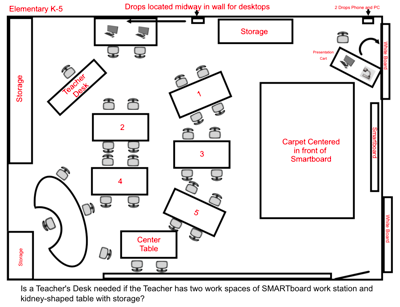
Classroom furniture has undergone major changes with the introduction of the SMARTboard.  As SMARTboards were mounted on the classroom walls, the teacher workspace was redefined.  The teacher laptop, and if possible document camera and other teacher tools, needs to be located near the SMARTboard.  These pieces of technology could fit on a teacher’s “traditional desk,” but many teachers have moved away from using a teacher desk, to using a workspace, such as a table or presentation cart for these technologies.  Do all students need a desk, chair, or table, if they work more comfortably on the floor given their developmental need to stretch or lay down when thinking, reading or writing?  Is there a need for a file cabinet?  With more teacher documents, maps and artifacts being digitized and able to be displayed on a SMARTboard with a click of a mouse, teachers are rethinking the need for the file cabinet (Just have to remember to back the work up on your “H” or external hard drive unless you have drank the Google-Aide!).  If the file cabinet has gone the way of the overhead, it may be time to place the cabinet in storage and make room for a larger reading center or collaborative space where small numbers of students can work comfortably together at a table or on the floor. While George Carlin was razzing us all about the amount of “stuff” in our homes, his humor can easily be applied to the classroom.  The classroom is home for teachers and students 188 of the 365 days in a school year.  Careful consideration given to the amount of classroom “stuff” and its place, is an important factor in strong teaching and learning.  If you are room-design challenged, there is almost always at least one teacher in your building who either appreciated George Carlin or has a classroom Feng Shui skill worthy of tapping.     


Wednesday, February 25, 2015

OK, so I haven't posted in a while.  Life has been busy!  I am now becoming a blogaholic (I think;).  I just read a couple student blogs from DS1 and the quality and variety is brilliant!  For those of you catching up and just starting to create your blogs, we (Liza Steffen, Sheldon Cox, Ryan Goff, Brian Bizzigotti and myself) will be out to support you.  We will also show you some of the other blogs so you can evaluate what others are doing and how it goes in blogland.  Stay tuned and keep creating, posting and sending me your blog info.

Wednesday, January 21, 2015

It all started way back when I was teaching in 6th grade at World of Inquiry School.  TBC;)